


jetAudio is a mp3 music player with 10/20 bands graphic equalizer and various sound effects.
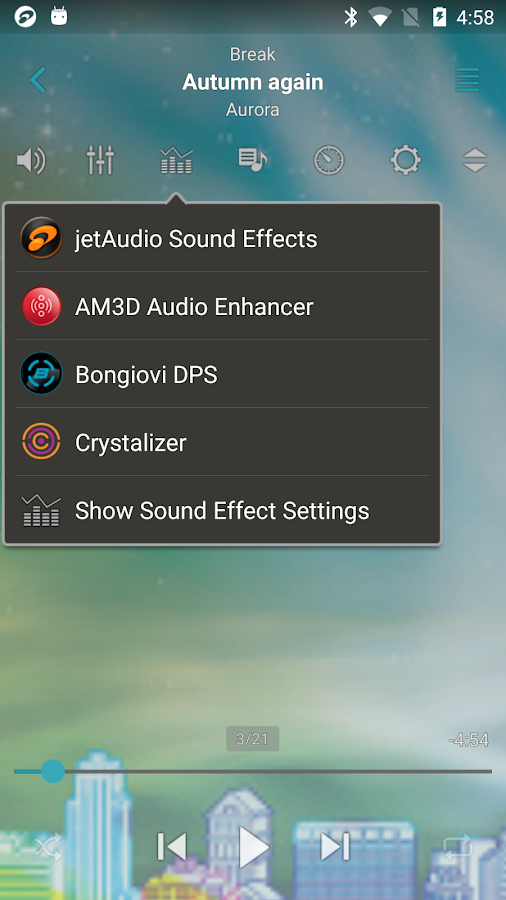
-- Sound Effects plugins --
* Crystalizer
* AM3D Audio Enhancer (http://www.am3d.com)
* Bongiovi DPS (http://www.bongioviacoustics.com)
(Sound effect plugins will be sold separately through in-app purchase.)
(Some plugins can be purchased in Plus version only.)
jetAudio is the highest rated and most downloaded media player on CNET.COM and now you can listen to same high-quality sound on your Android phone using jetAudio.
It plays almost any type of digital music files you have (.wav, .mp3, .ogg, .flac, .m4a, .mpc, .tta, .wv, .ape, .mod, .spx, .opus, .wma* and more) and, it provides a very high quality sound with various effects and enhancements such as Wide, Reverb, X-Bass.
It comes with 32 equalizer presets that will provide a wide array of listening experience.
For those who would like to customize their own sound experience, it also allows 10/20 bands graphic equalizer and other advanced playback functions including playback speed control, crossfading, AGC and much more.
Free Basic version provides same features with Plus version except advertisements and some features.
To enjoy full features of jetAudio, please purchase Plus version.
-- Features for Plus version only --
* 20-bands graphic equalizer
* Tag Editor (MP3, FLAC, OGG, M4A)
* Display lyrics in tag (Unsynchronized lyrics)
* 2 lock screens
* 14 app widgets : 4x1 (#2), 4x2 (#3), 4x3 (#3), 4x4 (#3), 3x3, 2x2, 2x3
* Pitch shifter
* Precise playback speed control (50% ~ 200%)
* Light Gray/White theme for browser (Plus only)
* Grid mode for Artist/Song/Folder/Genre browser
* Adjust FF/REW interval
* Expanded notification bar (for JB)
* MIDI playback (using jetAudio WaveTable MIDI synthesizer engine)
-- Features for Basic/Plus version --
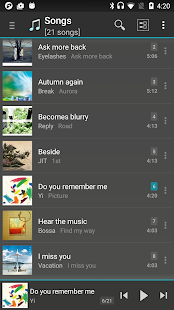
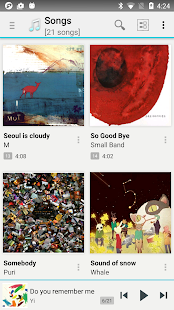
* Can choose between 3 List modes or 10 Grid modes for layout style
(In Basic version, layout style can be chosen in Album browser only)
* Find on YouTube
* Last.fm (requires official Last.fm app)
* X-Wide, Reverb, X-Bass sound effects
* AGC (automatic gain control) to avoid volume fluctuations between tracks
* Speed control from 50% to 200% (pitch adjusted)
* Crossfading, Gap-less playback
* Fade-in/Fade-out
* Repeat A<->B
* Browser and play music by artits, albums, songs, playlists, genres and folders
* Balance/Volume control
* Sleep timer up to 24 hours
* Flick up to post what you're listening to on Facebook/Twitter
* Flick down to show Now Playing
* Flick left/right to play next/previous
* Lock screens
* Headset button control (Bluetooth headset)
- press to pause/resume
- double/triple press to play next/prev
- long press to mute or TTS (time, title)
* Bluetooth headphone button control
* Send track information via Bluetooth AVRCP 1.3
* Multi-select function (Delete/Add to playlist)
* Keep screen on, Lock orientation options
* Shake to play next/previous track
* Supporting formats:
MP3, WAV, OGG, FLAC, M4A, MPC, TTA, WV, APE, MOD (module formats S3M, IT), SPX, OPUS, AIFF
(WMA may not be supported on some devices. Please check your device specification for WMA support)
-- Sound Effects plugins --
* Crystalizer
* AM3D Audio Enhancer (http://www.am3d.com)
* Bongiovi DPS (http://www.bongioviacoustics.com)
(Sound effect plugins will be sold separately through in-app purchase.)
(Some plugins can be purchased in Plus version only.)
jetAudio is the highest rated and most downloaded media player on CNET.COM and now you can listen to same high-quality sound on your Android phone using jetAudio.
It plays almost any type of digital music files you have (.wav, .mp3, .ogg, .flac, .m4a, .mpc, .tta, .wv, .ape, .mod, .spx, .opus, .wma* and more) and, it provides a very high quality sound with various effects and enhancements such as Wide, Reverb, X-Bass.
It comes with 32 equalizer presets that will provide a wide array of listening experience.
For those who would like to customize their own sound experience, it also allows 10/20 bands graphic equalizer and other advanced playback functions including playback speed control, crossfading, AGC and much more.
Free Basic version provides same features with Plus version except advertisements and some features.
To enjoy full features of jetAudio, please purchase Plus version.
-- Features for Plus version only --
* 20-bands graphic equalizer
* Tag Editor (MP3, FLAC, OGG, M4A)
* Display lyrics in tag (Unsynchronized lyrics)
* 2 lock screens
* 14 app widgets : 4x1 (#2), 4x2 (#3), 4x3 (#3), 4x4 (#3), 3x3, 2x2, 2x3
* Pitch shifter
* Precise playback speed control (50% ~ 200%)
* Light Gray/White theme for browser (Plus only)
* Grid mode for Artist/Song/Folder/Genre browser
* Adjust FF/REW interval
* Expanded notification bar (for JB)
* MIDI playback (using jetAudio WaveTable MIDI synthesizer engine)
-- Features for Basic/Plus version --
* Can choose between 3 List modes or 10 Grid modes for layout style
(In Basic version, layout style can be chosen in Album browser only)
* Find on YouTube
* Last.fm (requires official Last.fm app)
* X-Wide, Reverb, X-Bass sound effects
* AGC (automatic gain control) to avoid volume fluctuations between tracks
* Speed control from 50% to 200% (pitch adjusted)
* Crossfading, Gap-less playback
* Fade-in/Fade-out
* Repeat A<->B
* Browser and play music by artits, albums, songs, playlists, genres and folders
* Balance/Volume control
* Sleep timer up to 24 hours
* Flick up to post what you're listening to on Facebook/Twitter
* Flick down to show Now Playing
* Flick left/right to play next/previous
* Lock screens
* Headset button control (Bluetooth headset)
- press to pause/resume
- double/triple press to play next/prev
- long press to mute or TTS (time, title)
* Bluetooth headphone button control
* Send track information via Bluetooth AVRCP 1.3
* Multi-select function (Delete/Add to playlist)
* Keep screen on, Lock orientation options
* Shake to play next/previous track
* Supporting formats:
MP3, WAV, OGG, FLAC, M4A, MPC, TTA, WV, APE, MOD (module formats S3M, IT), SPX, OPUS, AIFF
(WMA may not be supported on some devices. Please check your device specification for WMA support)